No items found.
Skip to main content
July 2024

Aviation Keyboard

New pilot-focused keyboard streamlines waypoint entry and note taking.

No images available to display.
back
next

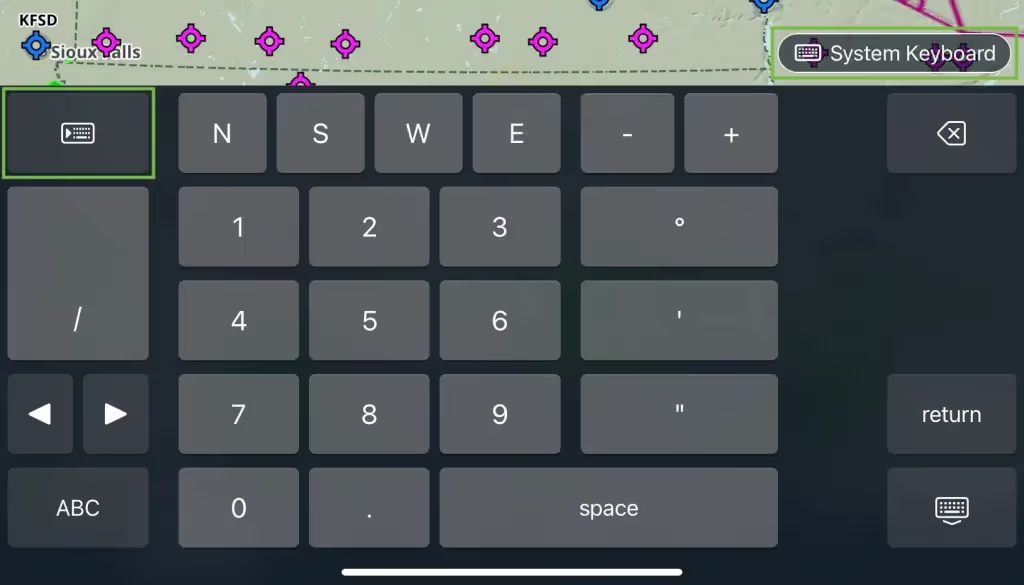
Streamline your waypoint entry and note taking with the perfect keyboard for pilots. This keyboard option simplifies symbol entry for pilots with a top row of numbers (0-9) and features two versions: an alphanumeric keyboard and a number keyboard, with right- and left-handed modes. Tap the button above the keyboard to switch between the old and new keyboards, and tap the number button in the bottom-left for a coordinate-friendly numpad. The Aviation Keyboard is enabled by default but can be disabled in More >Settings > Preferences.

Release notes

Release notes

  • This keyboard option simplifies symbol entry for pilots with a top row of numbers (0-9) and features two versions: an alphanumeric keyboard and a number keyboard, with right- and left-handed modes.
  • Tap the button above the keyboard to switch between the old and new keyboards, and tap the number button in the bottom-left for a coordinate-friendly numpad.
  • The Aviation Keyboard is enabled by default but can be disabled in More > Settings > Preferences.

Support

Support

FAQs
Find answers to your questions
Pilot's Guide
The complete ForeFlight handbook
Video Library
ForeFlight videos all in one place
Buying Guide
Choose the right iPad and plan